




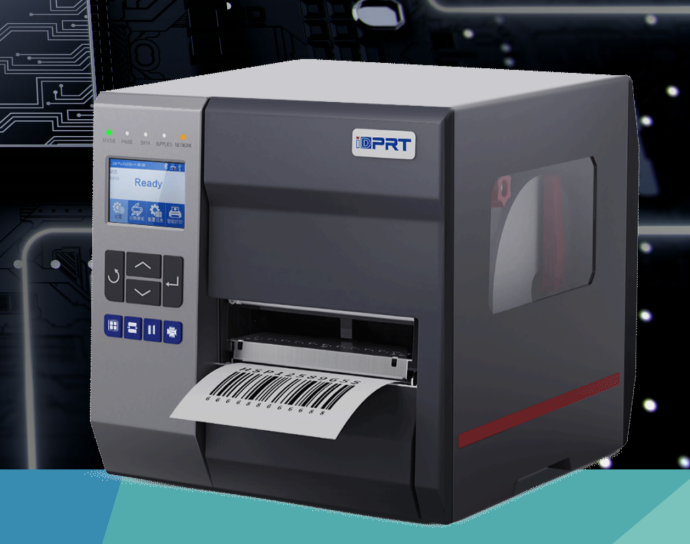
The iDPRT iQ4 is a compact industrial barcode label printer for production, warehouse, packaging, and other labeling workstations where space is limited but daily label output still matters. It supports both direct thermal and thermal transfer printing, helping teams handle short-life logistics and retail labels as well as more durable labels for traceability, product identification, and inventory control.
With a all-metal structure, up to 10 ips print speed, and configurable workflow options, the iQ4 fits fixed labeling points close to the work, including packaging stations, areas near shelving, and rack-mount applications with height limitations.
When a Compact Industrial Printer Is Better Than a Desktop Printer
A compact industrial barcode printer is the better choice when a space-constrained labeling station needs industrial media capacity, workflow accessories, and flexible connectivity—for example, a packing bench printing carton labels throughout the day or a production station issuing batch and inspection labels on demand.
A desktop barcode printer can still be the right choice for many commercial applications, such as occasional price tags, short-run labels, and low-volume office tasks, as well as asset labels that do not require high-volume thermal transfer workflows.
A compact industrial thermal printer becomes the stronger choice when labels are printed repeatedly at a production line, warehouse station, receiving desk, or packing bench. Below is a quick comparison to help you choose the right printer type.
| Choose a Desktop Printer When… | Choose a Compact Industrial Printer Such as the iDPRT iQ4 When… |
|---|---|
| The printer supports occasional or lower-demand labeling tasks in an office, retail backroom, or light-duty workstation. | A rugged barcode printer is needed for regular labeling during the day at a production, warehouse, receiving, or packing workstation. |
| The available print speed meets the application requirement. | The application requires up to 10 ips output without moving to a larger enterprise-class printer. |
| Small media rolls and manual tear-off are acceptable. | Larger media capacity or peel, rewind, cutter, and GPIO options can reduce interruptions or manual steps. |
| Basic USB or Bluetooth connectivity is enough. | Ethernet, optional Wi-Fi, EAP-enabled wireless access, or multiple interfaces are needed. |
What Features Make the iDPRT iQ4 Suitable for Space-Limited Workstations?
The iDPRT iQ4 combines the practical footprint of a compact industrial printer—258 mm W × 287 mm H × 406 mm D—with the features needed for day-to-day operational labeling.
This compact 4-inch light industrial printer supports fast, consistent batch label printing at production, warehouse, receiving, and packing workstations without occupying excessive workspace. It is widely used in warehousing and logistics, manufacturing, retail, and apparel.
-
●
Compact industrial design: All-metal construction in a space-efficient 4-inch format for height-limited rack-mount applications and tight under-counter or under-shelf mounting locations.
-
●
Less downtime during regular print runs: Supports up to 8-inch media rolls and 450 m ribbons to reduce media and ribbon changes.
-
●
Fast, high-precision printing: Up to 10 ips at 203 dpi, with 203/300 dpi options for shipping, carton, barcode, batch, inventory, and traceability labels, including small text and fine details.
-
●
Configurable for diverse labeling workflows: Optional peeler, rewinder, cutters (guillotine/rotary), and GPIO interface support manual application, precision cutting, batch rewinding, and automated system integration.
-
●
Simple daily operation: 2.4-inch color display, operation buttons, and status LEDs for clear setup, calibration, and routine printing.
-
●
Flexible connectivity and integration: RS-232, USB-B, USB Host, Ethernet, and Bluetooth 5.0, with optional Wi-Fi 5/Wi-Fi 6 and EAP-enabled wireless authentication.
What Is the iDPRT iQ4 Used For?
Production, WIP, and Quality-Control Labeling
Production cells and quality-control benches often have limited space beside conveyors, inspection equipment, and packing tools. In these environments, teams need to print work order labels, batch labels, process labels, inspection labels, serial-number labels, and QR-code traceability labels directly at the station.
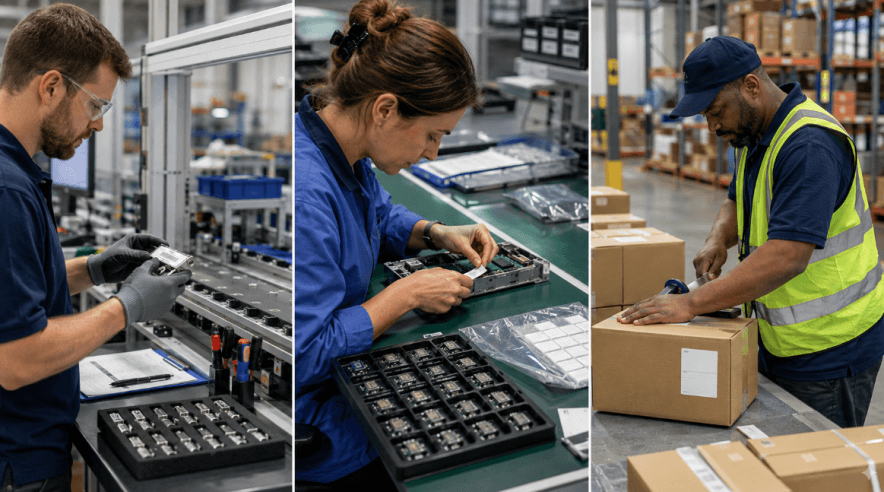
The iQ4 compact light industrial printer produces durable labels that withstand handling, storage, and production environments. Featuring 203 dpi and 300 dpi resolutions for versatile barcode and graphic output, along with Ethernet and GPIO support, it fits directly into fixed manufacturing workstations.
Small-Label Peel-and-Apply Workstations
Electronic components, micro-PCBs, samples, medical supplies, jewelry and compact packaging often require miniature ID tags and component labels that are easy to separate and apply by hand. In these precision workflows, manual label handling can create as much delay as the printing process itself.
The iDPRT iQ4 efficiently peels micro-labels and ID tags as small as 5 mm in height. With the optional peel and rewind configuration, operators can immediately remove printed ID tags at the workstation and apply them directly to electronic components, assemblies, or containers.
Warehouse, Carton, and Shipping Labels
Receiving and packing teams need labels at the point where goods are checked, packed, transferred, or dispatched. Common examples include inbound labels, location labels, carton labels, transfer labels, replacement labels, and shipping labels.
The iQ4 provides up to 10 ips printing at 203 dpi for regular warehouse and packaging output. Its 4-inch print width supports common carton and logistics label formats, while its 450 m ribbon capacity can help reduce changeovers when thermal transfer labels are required.
Garment Tags, Wash Care Labels, and Shared Retail Re-tagging
Garment factories, brand fulfillment hubs, and retail backroom stockrooms frequently print specialized media such as fabric wash-care labels, heavy cardstock hangtags, fabric content labels, and replacement barcodes for seasonal markdowns or return processing.
Thick tag stock and nylon or satin ribbons place high demands on motor torque and media tension—conditions that often cause standard desktop printers to slip or jam. Built with an industrial-grade media-handling mechanism, the iDPRT iQ4 reliably feeds and prints care labels and heavy cardstock tags, delivering wash-durable, fade-proof text and precise alignment without paper jams.
The iQ4 also works well as a centralized backroom labeling station. It can accept network print jobs from multiple handheld PDAs or connect directly to a barcode scanner for standalone “scan-to-reprint” workflows, streamlining hangtagging, batch price markdowns, and restocking of returned merchandise.
iDPRT iQ4 Specifications at a Glance
| Feature | iDPRT iQ4 |
|---|---|
| Print method | Direct Thermal / Thermal Transfer |
| Resolution | 203 dpi / 300 dpi |
| Maximum print speed | Up to 10 ips at 203 dpi; up to 8 ips at 300 dpi |
| Maximum print width | 4.1 in. / 104 mm at 203 dpi; 4.17 in. / 106 mm at 300 dpi |
| Maximum ribbon length | 450 m |
| Connectivity | RS-232, USB-B, USB Host, Ethernet, Bluetooth 5.0; optional Wi-Fi |
| Wireless security support | EAP-TLS and EAP-PEAP with optional Wi-Fi |
| Workflow options | Peel, rewind, guillotine cutter, rotary cutter, GPIO |
| Small-label capability | Peel labels as small as 5 mm in height |
| Printer languages | ZPL II, TSPL, DPL, EPL2 |
What to Confirm Before Installing the iQ4 in a Tight Workspace
A small-footprint industrial barcode printer can save valuable workspace, but the printer dimensions are only one part of installation planning. Teams should confirm the full operating area before placing the iQ4 beside production equipment, on a shelf, or at a packing bench.
Check these factors before installation:
- Top clearance: Leave enough space to load media and replace thermal transfer ribbon.
- Front clearance: Allow room for tear-off, peeling, cutting, or rewinding labels.
- Rear clearance: Reserve space for the power cable, Ethernet cable, USB connection, or serial connection.
- Side access: Keep access available for media changes, cleaning, and routine maintenance.
- Surface capacity: Confirm that the workstation, shelf, or cabinet can safely support the printer and loaded media.
- Media requirements: Verify label width, label height, media thickness, sensing marks, and required accessories before ordering.
If the printer will be placed in a cabinet, on a shelf, or beside a production machine, confirm the complete operating clearance—not only the printer footprint. A tight installation that prevents media loading or label removal will slow the workflow it was intended to support.
Ready to Build a More Efficient Labeling Workstation?
Explore the iDPRT iQ4 compact industrial thermal printer to find the right configuration for your label size, media, connectivity, and workflow requirements. Contact the iDPRT team to discuss peel, rewind, cutter, GPIO, and wireless options for your application.
Contact Our Experts